
Congratulations. You’ve successfully containerized your legacy monolith, slapped it into a Kubernetes cluster, and now you’re telling your stakeholders that you’re “cloud-native.” It’s a beautiful sentiment, really. You’ve traded the headache of managing individual VMs for the existential dread of managing a distributed system that has more moving parts than a Star Destroyer’s maintenance log.
But here’s the thing: just because you’re using EKS (Elastic Kubernetes Service), GKE (Google Kubernetes Engine), or some other acronym-heavy managed service doesn’t mean you’re secure. In fact, you’ve likely just increased your attack surface in ways you haven’t even begun to map yet. This is where “blackboxing” comes in, treating your cluster like the mysterious, obsidian-colored box of complexity it is and seeing what happens when we start poking it with a stick.
In this post, we’re going to look at the basics of Kubernetes architecture, why you desperately need to penetration test it, and how seemingly “standard” enterprise workflows, like your CI/CD pipeline, are actually just red carpets for attackers.
Let’s get some quick definitions out of the way:
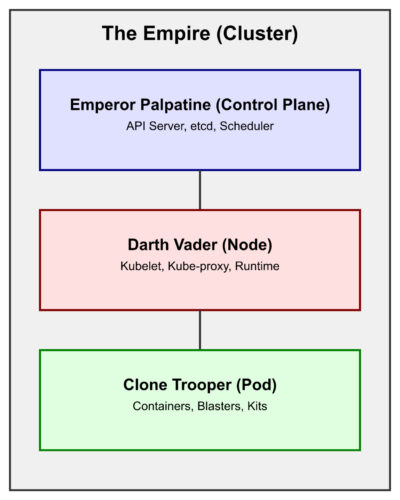
• Cluster (The Empire): Your entire cloud-native empire. A collection of nodes that work together (mostly) to run your containerized apps.
• Control Plane (Emperor Palpatine): The “brains” of the operation. It decides what runs where and keeps the state of the cluster. If the Emperor is compromised, the empire falls.
• Node (Darth Vader): The “muscle” and field commander. Physical or virtual machines that do the actual work of enforcing the Emperor’s will (running your pods).
• Pod (The Clone Trooper): The smallest unit in K8s. Think of it as an individual soldier. One Clone Trooper can carry multiple “blasters” (containers), but they operate as a single unit.
• Container (The Blaster/Kit): The actual application code and its dependencies, the payload carried by the Trooper.
• Kubelet (The Comms Link): The tiny agent running on each node that makes sure containers are running in a pod. It’s the one taking orders directly from Vader (the Node) and the Emperor (the Control Plane).
• RBAC (Role-Based Access Control): The chain of command. It decides who has the clearance to access the Death Star’s plans. It’s usually either too strict or so loose that a farm boy from Tatooine can blow up the whole thing.
• EKS (Elastic Kubernetes Service): The Empire’s outsourced construction crew (AWS). It provides the underlying infrastructure for your cluster so you don’t have to build your own Death Star from scratch.
• ECR (Elastic Container Registry): The armory where all your blasters (images) are stored and scanned for defects before being issued to troopers.
• IAM (Identity and Access Management): The biometric scanners and keycards used to prove you are who you say you are before Vader lets you onto the bridge.
• SIEM (Security Information and Event Management): The central command center’s monitoring screens. It’s supposed to alert you when a rogue droid is plugging into a computer terminal, but often just shows a lot of blinking lights.
• Namespace: A way to logically divide your Empire into different star systems (Dev, Staging, Prod). This keeps the Rebels in the outer rim from knowing what’s happening on the Death Star.
• Service Account: An identity granted to a droid or trooper (a pod) to perform tasks on your behalf. If this droid has the wrong clearance, it can start deleting entire planets.
• Admission Controller (The Imperial Guard): The final check before any trooper is allowed onto the battlefield. It ensures they are properly geared and aren’t carrying any unauthorized contraband.
• etcd (The Sith Holocron): The secret vault where the Emperor stores all his forbidden knowledge (cluster secrets). If this is stolen, your entire history and future are in the hands of the Rebels.
The Hierarchy of Pain: A Kubernetes Breakdown
Before we get into the fun stuff, we need to understand what we’re looking at. Kubernetes isn’t a single thing; it’s a hierarchy of components that all have to play nice together. When they don’t, things go sideways.
1. The Cluster (The Empire)
At the top, you have the Cluster. This is the entire world. It consists of the Control Plane (Emperor Palpatine), the brains, and the Nodes (Darth Vader), the muscle.
The Control Plane is where the magic happens. It contains the API Server (the front door for all commands), etcd (the database that stores every single secret and configuration), and the Scheduler (the guy who decides which node gets to run your messy code). If an attacker gets Control Plane access, it’s game over. They own the Emperor. Imagine an attacker finding an exposed etcd instance; they don’t even need to hack your app, they just read your kube-root-ca and create their own Sith-level cluster-admin user.
2. The Node (Darth Vader)
Nodes are the physical or virtual machines that actually run your code, acting as field commanders. In an enterprise environment, these are usually managed by a service like EKS. Each node runs a few critical components: – Kubelet (The Comms): The local agent that takes orders directly from the Control Plane. If you can talk to the Kubelet’s API directly (often on port 10250), you can execute commands in pods without ever touching the Emperor’s API server. – Kube-proxy: The networking wizard that handles routing. – Container Runtime:</strong> (like containerd</code>). This is the engine that pulls your images and turns them into running processes.
3. The Pod (The Clone Trooper)
This is where people get confused. You don’t “run” a container in Kubernetes; you run a Pod. A Pod is the smallest deployable unit, the individual Clone Trooper. They share a network namespace, which is great for “sidecars” and even better for lateral movement. If I break into your “logging sidecar,” I’m effectively inside your “main Trooper’s kit” from a networking perspective.
4. The Container (The Blaster/Kit)
Finally, at the very bottom, we have the container. This is your application, its dependencies, and, all too often, a bunch of vulnerabilities you didn’t know you had because you haven’t updated your base image since the Clone Wars. It’s the “inner sanctum” of your code, but as we’ll see, it’s often the easiest part to poison.
Why Even Bother Pentesting This?
“But we use a managed service!” I hear you cry. “Amazon/Google/Microsoft manages the security!”
Bless your heart.
They manage the infrastructure. They make sure the API server is up and the nodes are patched at the OS level. They do not manage your misconfigured RBAC roles, your overly permissive Pod Security Policies (or lack of Admission Controllers), or the fact that your developers are pulling latest from a public registry they found on a forum.
Pentesting a Kubernetes cluster isn’t just about finding an exploit. It’s about verifying that the “invisible” security boundaries you think you have actually exist, or if you’ve left a thermal exhaust port wide open for a farm boy to find. It’s about answering questions like: – Can a compromised pod talk to the Node’s metadata service and steal IAM credentials? (Standard EKS trick: curl http://169.254.169.254/latest/meta-data/iam/security-credentials/) – Can a developer accidentally deploy a malicious image that bypasses all your scanners? – Does your CI/CD pipeline have enough permissions to delete the entire production namespace? (Spoiler: it usually does because “it was easier to set up that way”).
The Blackboxing Methodology: How We Poke the Box
When we approach a “blackbox” assessment of a Kubernetes environment, we don’t just start throwing exploits at it. We follow a structured methodology that mirrors how a real-world attacker would operate.
Phase 1: Reconnaissance (The “Probing the Shields” Phase)
We start by looking at the public-facing footprint. Are there exposed LoadBalancers? Is the API server publicly accessible? (It shouldn’t be, but you’d be surprised). We look for “leaky” services like an exposed Prometheus instance or a dashboard that doesn’t have authentication.
Phase 2: Initial Access (The “Breach in the Hull” Phase)
This is where we find a way into a pod. It might be a classic web vulnerability like SQL injection or SSRF, or, as we’re about to see, it might be a supply chain attack that delivers us a shell on a silver platter.
Phase 3: Post-Exploitation & Enumeration
Once we have a shell in a pod, we start asking:
- Who am I? (Checking the service account token in
/var/run/secrets/kubernetes.io/serviceaccount/token) - What can I do? (Running
kubectl auth can-i --list) - Where can I go? (Scanning the internal network for other pods or the Node’s metadata service).
Phase 4: Lateral Movement & Privilege Escalation
This is where the fun starts. Can we move from a low-privilege pod to the Node? Can we escape the container and get root on the host? Can we pivot from the Node to the entire AWS environment?
CI/CD Compromise: The Enterprise Supply Chain Nightmare
Let’s talk about the “Enterprise” way of doing things. You have a beautiful CI/CD pipeline. Code goes in, tests run, a Docker image is built, scanned, and pushed to a private registry. It’s clean. It’s professional.
It’s also a giant target.
Supply chain attacks are the new hotness, and for good reason. Why bother trying to break into a hardened cluster when I can just wait for your developers to do the work for me?
Imagine a scenario where a developer needs a new utility library for the build process. They find a package that looks legitimate; it’s an internal-looking tool like abricto-build-utils. They run npm install, and everything seems fine.
The Hook
In package.json, there’s a little feature called a postinstall hook. It’s designed to help set up the environment. For an attacker, it’s a “run this code as soon as the victim touches it” button.
{When your CI/CD runner (which, let’s be honest, probably has cluster-admin or at least very high AWS/K8s privileges) runs npm install, that scripts/setup.js executes.
The Payload
In our simulation, our script does two things: it steals your environment variables (the keys to your kingdom) and gives us a reverse shell.
Because this runs during the build process, it’s often overlooked. The build completes, the tests pass, and meanwhile, I’m sitting in your build container, downloading your Kubeconfig and looking for your Terraform state files.
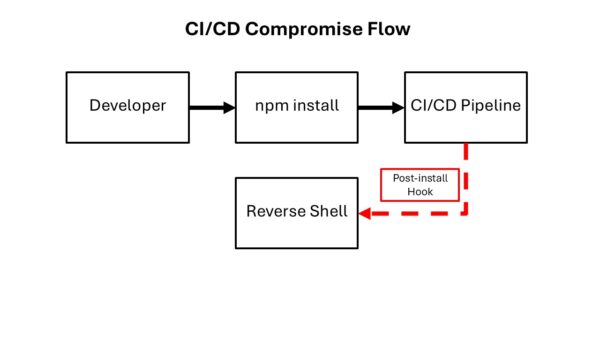
This stresses the absolute necessity of library awareness. If you aren’t auditing your package.json or requirements.txt with the same rigor you audit your application code, you’re essentially leaving your front door unlocked because you have a “Security System” sign in the yard.
Image Sideloading: The Shortcut to Bypass
Now, you might say, “We have image scanning! Any malicious image will be caught when it’s pushed to ECR (Elastic Container Registry)!”
That’s a great theory. Let’s test it.
In an enterprise environment, we often want to test things quickly without waiting for a 20-minute CI/CD cycle. This leads to “shortcuts.”
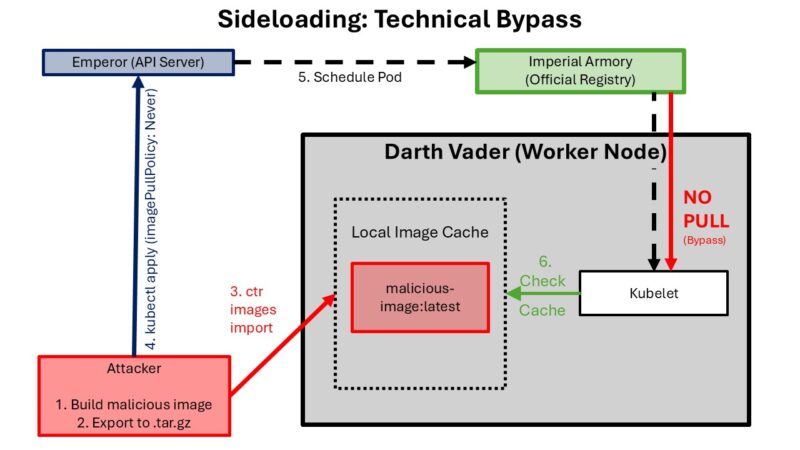
An attacker who has gained a foothold on a worker node (perhaps through that reverse shell we just talked about) doesn’t need to push a malicious image to your registry. They can just “sideload” it directly into the node’s local cache.
The Attack Vector
If I have access to the node, I can use the container runtime directly. On most modern EKS nodes, that’s containerd.
Now the image abricto-sideload:latest exists on the node. It has never seen your ECR registry. It has never been scanned by your “enterprise-grade” vulnerability management tool.
Bypassing Admission Controllers
To run this, the attacker just needs to deploy a pod that points to this local image. The trick is the imagePullPolicy.
By setting imagePullPolicy: Never, we tell Kubernetes: “Don’t bother checking the registry. I promise it’s already there.” Kubernetes, being the helpful orchestrator it is, says “Okay!” and starts the container.
The Danger Zone: Escaping the Detention Block
Getting into a pod is just the beginning. The real danger is what happens next. If you think your “Pod Isolation” is a bulletproof shield, you might want to read up on how log mounts can lead to a full escape. They do a really good job of explaining a PoC of a symlink vulnerability within K8.
If an attacker lands in a pod with the right permissions, the isolation isn’t just thin, it’s non-existent.
Escape Pod to Worker Node: The Technical Chain
If a compromised pod’s Service Account has permission to create and exec pods, an attacker can deploy a new malicious pod that mounts the worker node’s root filesystem (/) into the container. This breaks out of pod isolation and provides direct read/write access to the underlying host’s filesystem.
Step 1: Confirm Permission to Create Pods From inside the compromised pod, we verify our Service Account’s reach:
Step 2: Build the Malicious Pod Manifest The manifest deploys a pod with two key misconfigurations: 1. securityContext.privileged: true: Removes container isolation. 2. hostPath: /: Mounts the worker node’s entire root filesystem into the pod at /attacker.
Step 3: Access the Worker Node Filesystem
Once the pod is running, we confirm exec permissions and start harvesting:
Step 4: Full chroot to Worker Node Shell
Finally, we drop the hammer. We use chroot to move our root to the host’s filesystem, effectively becoming a root user on the worker node itself.
Attack Chain Summary
Compromised Pod → kubectl auth can-i create pods (verify permission) → Deploy malicious pod (privileged + hostPath:/) → kubectl exec into malicious pod → Access /attacker/* (= worker node filesystem) → chroot /attacker (full worker node shell)
This is a critical failure of visibility. If your security team is only looking at registry logs, they will never see this pod start. It’s a ghost in the machine.
Defense-in-Depth: How to Not Be the Next Headline
If all of this has given you a mild panic attack, good. That’s the first step to better security. Now, let’s talk about how to actually mitigate this. Kubernetes security is a game of layers. If you rely on just one (like image scanning), you’re going to lose.
1. Enforce Registry Integrity (Kill the Sideload)
Image Sideloading only works because the cluster allows the imagePullPolicy: Never. You need to implement an Admission Controller that enforces “Known-Good” registries. – Write a policy that only allows images from your private, scanned ECR/GCR/ACR registry. Forbid Never: Unless there is a very specific, documented reason, your production clusters should never allow imagePullPolicy: Never.
2. Lock Down Your CI/CD Pipelines
CI/CD Compromise succeeds because the pipeline is too permissive.
- Isolate Your Build Runners: Each build should run in its own, ephemeral, isolated environment. No access to other builds, no long-lived secrets.
- Scan for
postinstallHooks: Use tools likenpm auditor specialized supply chain security tools that explicitly flag packages with suspicious scripts. - Run with
--ignore-scripts: For many enterprise projects, you don’t actually need to run post-install scripts. If you don’t need them, disable them globally in your CI environment:npm install --ignore-scripts. - NOTE: npm is just the example we used, so reference your pipeline’s documentation for a similar process.
3. Runtime Security: The Last Line of Defense
When an attacker like us manages to get a shell, we almost always do something “weird.”
- Monitor for Shells: Use tools to alert whenever a container (especially a production one) spawns a shell process.
- Network Policies: By default, every pod in your cluster can talk to every other pod. Change this. Use Network Policies (or a service mesh) to enforce a “Zero Trust” model. If the “Front-End” pod doesn’t need to talk to the “Secret Manager” pod, it shouldn’t be able to.
4. Visibility & Logging: The Art of Knowing What Isn’t There
In Image Sideloading, the biggest indicator of an attack wasn’t a “Malicious Image Detected” alert; it was the absence of a registry pull log for a new pod. I find your lack of visibility disturbing.
- Correlate Your Logs: Your SIEM should be smart enough to ask, “Hey, I see a pod starting in the ‘finance’ namespace, but I don’t see a corresponding image pull event in ECR. Why?”
- Monitor Kube-Audit Logs: These are the gold mine of Kubernetes security. Every action on the API server is logged here. Watch for unusual namespace creations or service account usage.
Final Thoughts: The Kube is Never “Done”
Kubernetes is a powerful tool, but like any powerful tool, it’s exceptionally good at hurting you if you don’t respect it. The hierarchy of components creates a complex web of trust that an attacker only needs to snag once to start climbing.
Whether it’s the slow, insidious poisoning of your supply chain in CI/CD Compromise or the direct, “sideloaded” gut-punch of Image Sideloading, the vulnerability isn’t just in the code; it’s in the assumptions we make about our environment’s integrity.
So, go ahead. Blackbox your cluster. Poke it. Prod it. See if your “invisible” security boundaries actually hold up. Because I guarantee you, someone else is already trying to see if they’ll break.
Stay paranoid, stay curious, and keep those pods locked down. May the logs be with you.
(Note: Images and specific code samples used in this post are for educational purposes within the context of our security simulation framework. For more information on how to test your own environment, visit Abricto Security.)
